Showing posts with label TECH. Show all posts

Saturday, 18 April 2015

Lost Your Phone? Google Search 'Find My Phone' To Locate It

Google-Search-Find-My-Phone.png
How many of you have an issue to forget your mobile phones? I guess, most of us.

Sometimes in our homes, sometimes in our offices, sometimes in our cars and sometimes we even don’t remember the exact place where we left our phones. 

Now, Finding your phone is as simple as searching something on Google...

Instead of searching your phone everywhere, just ask Google where your phone is, and the search engine giant will answer you the exact place where you left your smartphone. 

Sound’s interesting!

Google unveiled a new feature on Wednesday that lets you search for your Android smartphone or tablet using the search engine on your desktop computer.

How does it work?
  • Log-in to the same Google account on your desktop computer’s browser that you use on your Android smartphone, but before that make sure you must have the latest version of the Google app installed on your smartphone.
  • Now type "Find my phone" into Google's search engine, and that’s it.
As soon as you press the enter button, Google will display a map that eventually shows you a location on the map that is accurate to a certain distance, as for example, the map showed me the location of my smartphone was accurate to 35 feet.

However, what if your phone is not visible to you?

Google also offers you a Ring button on the map in order to pinpoint your phone. 

You just need to click on Ring icon and the search engine giant will ring your smartphone at full volume for up to five minutes. Moreover, once you hand on it, simply press the power button to turn off the ringing.

Not Google alone…

...a similar feature known as Android Device Manager can also help you locate and ring your Android devices. Also in case your Android device has been stolen, this feature helps you to factory reset your device remotely and reset the password if the device is recovered or erase its data.

Apple also offers a similar tracking feature, known as Find My iPhone, that helps iOS users to track down their missing iPhone or iPad, remotely locate its exact location by ringing, lock it and erase its data.

Wednesday, 15 April 2015

Google Launches Chrome 42 with Push Notifications


download-update-google-chrome
Google has finally rolled out the latest version of its popular web browser, i.e. Chrome 42 for Windows, Mac, and Linux users that now lets websites send you alerts, no matter your browser is open or not.

The release of the latest Chrome 42 version is a great deal as it costs Google more than $21,000.

Yes, $21,000!

The latest version of Chrome comes with fixes for 45 security vulnerabilities in the web browser, reported by different security researchers [listed below].Let's know about the Major updates:

Major updates and significant improvements for Chrome version 42 includes:
  • Advanced Push API and Notifications API
  • Disabled Oracle's Java plugin by default as well as other extensions that use NPAPI
  • Patched 45 security bugs and paid out more than $21,000
Push API:

Google includes Push API in its web browser for the first time. Push API, when combined with the new notifications API, allows websites to push notifications to you through your browser, even when the browser window is closed.

The Push API feature is an optional feature, which means that you can enable or disable it as per your need. This will offer users an app-like experience on the web.

What else?

Chrome 42 brings the end of official support for NPAPI ("Netscape Plugin API") by disabling old browser plugins by default that use NPAPI, including Oracle’s Java plugin and Silverlight.

However, if you really want this blocked plugin, you can manually enable NPAPI support in Chrome's settings. But, you’ll not enjoy NPAPI support for a long time as by September this year, Google will permanently remove this option.

Why Google want to vanish NPAPI?

The open-source project team has been trying to kill off NPAPI since 2013, describing NPAPI as a dangerous security and stability risk.

The search engine giant believes that by disallowing to run Java plugin would certainly reduce the possibility of the attack against its Chrome browser.

Google patches total 45 security holes in its Chrome Browser:

There were a number of high-severity vulnerabilities, including one known as Cross-origin bypass in the HTML parser. An anonymous security researcher was paid a reward of $7,500 from Google for this critical vulnerability.

The list of rest security bugs fixed in Chrome 42 for which Google paid rewards are:
  • CVE-2015-1236 (Medium): Cross-origin-bypass in Blink -- Reward $4000 to Amitay Dobo
  • CVE-2015-1237 (High): Use-after-free in IPC -- Reward $3000 to Khalil Zhani
  • CVE-2015-1238 (High): Out-of-bounds write in Skia -- Reward $2000 to cloudfuzzer
  • CVE-2015-1240 (Medium): Out-of-bounds read in WebGL -- Reward $1000 to w3bd3vil
  • CVE-2015-1241 (Medium): Tap-Jacking -- Reward $1000 to Phillip Moon and Matt Weston of Sandfield Information Systems
  • CVE-2015-1242 (High): Type confusion in V8 -- Reward $500 to fcole@onshape.com
  • CVE-2015-1244 (Medium): HSTS bypass in WebSockets -- Reward $500 to Mike Ruddy
  • CVE-2015-1245 (Medium): Use-after-free in PDFium -- Reward $500 to Khalil Zhani
  • CVE-2015-1246 (Medium): Out-of-bounds read in Blink -- Reward $500 to Atte Kettunen of OUSPG
  • CVE-2015-1247 (Medium): Scheme issues in OpenSearch -- Reward $500 to Jann Horn
  • CVE-2015-1248 (Medium): SafeBrowsing bypass -- Reward $500 to Vittorio Gambaletta (VittGam)
So, if I talk about the total cost Google spent in bug bounties to external security researchers who contributed reported bugs fixed in this latest version, its around $21,500 in total.

Let's Update Chrome 42:

You can now update this latest version, Chrome Version 42, using the browser’s built-in silent update or download it straight forward from google.com/chrome. Linux users need to install the Distro Package Manager.

Have you updated Chrome 42 already? Let us know your experience with Chrome 42 in the comment box below!

Saturday, 11 April 2015

Hidden Threats under URL Shortening Services !

MacAfee Launches its URL Shortening Service


AppAppeal was ranked 1st amongst the popular URL shorteners . The list includes popular shorteners like TinyURL ,Bit.ly, Goo.gl, is.gd & OW.ly. However  on the other hand, these URL shorteners hide a large number of malicious URLs.
According to reports,MaAfee Labs have discovered the following results :


However apart from these services there are many more URL shortening services available on the internet. Domains requested for URL shortening are COM,LY,ME,US,TO,NET,GD & CC. However 2/3rd of these sites lead to advertising web pages or webpages show that their domain names have been put for sale. Moreover,these services require registrations,; but most of them are found to be directly usable. According to reports, URLs which were most hit by malwares in the recent past are:
  • goo.gl
  • bit.ly
  • is.gd
  • tinyurl.com
  • ow.ly
  • y.ahoo.it
  • tiny.cc
  • 0845.com
  • jmb.tw
MaAfee has now released it own URL shorteners for Internet users. This service uses the domain mcaf.ee. It checks and confirms if the site is malicious &  if it is secure for the users, mcaf.ee short URLs add a frame to the top of the destination page thus confirming if has good ranking from Site Advisory.
However if the URL is malicious the user will be stopped !

This services can be added as an add-on for Google Chrome and as a extension for Firefox.

Friday, 3 April 2015

10 Speed Hacks That'll Make Google Chrome Blazing Fast on Your ComputeR

Image result for chrome speed booster

If browsing speed is important to you—and it should be—you'll probably be interested to know that there are ten simple flag modifications you can make in Google Chrome in order to achieve the fastest browsing speed possible.
 Below, I'll show you how to enable them, along with a few other speed-increasing tips.

Step 1: Access Chrome's "Secret" Settings

Chrome allows you to use unofficial browser features called "flags" while they are being tested or are generally unstable. These features are strictly experimental and may break or disappear at any time. In other words, take advantage of them while you can.
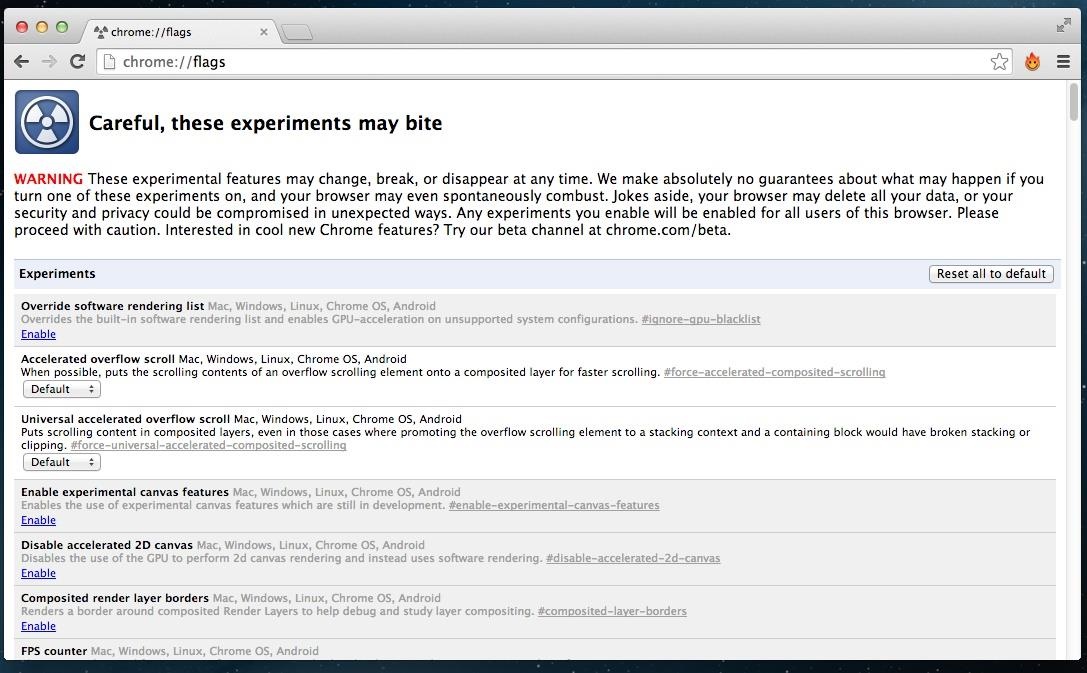
To access these secret settings, simply enter chrome://flags into your address bar, aka the omnibox Hit the Enter key, and you will be brought to the flags page and shown a short warning.
It's okay. These features can all be disabled later if you notice any glitches.

Step 2: To Make Things Simple, Open "Find…"

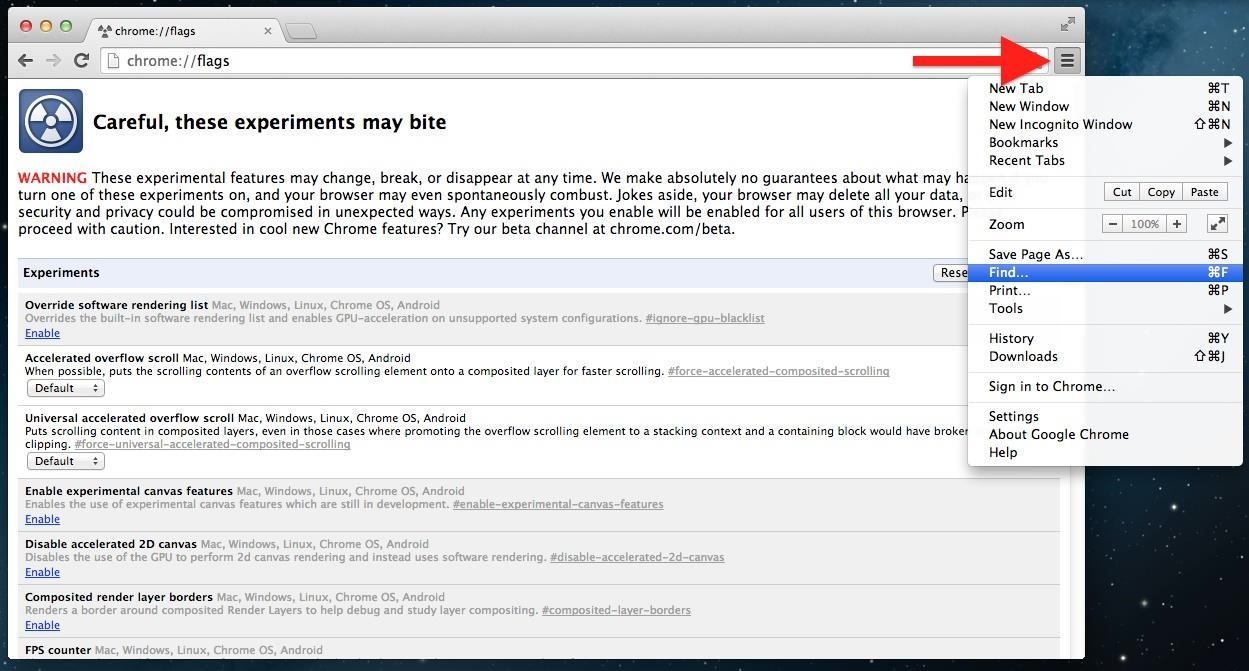
These flags aren't very organized, so to save you from scrolling up and down all day, hit Cmd+F (Mac) or Ctrl+F (Windows), or click the three-line overflow menu button in the upper-right and select "Find…".

Step 3: Pick & Choose Your Chrome Speed Hacks

Now, below are ten different settings you can mess with in Google Chrome, but you don't need to enable all of them. Pick and choose the ones you want, and find the combination that works best with your workflow. Some things may not apply to your particular browsing game.

Speed Tip #1: Set "Maximum Tiles" to 512

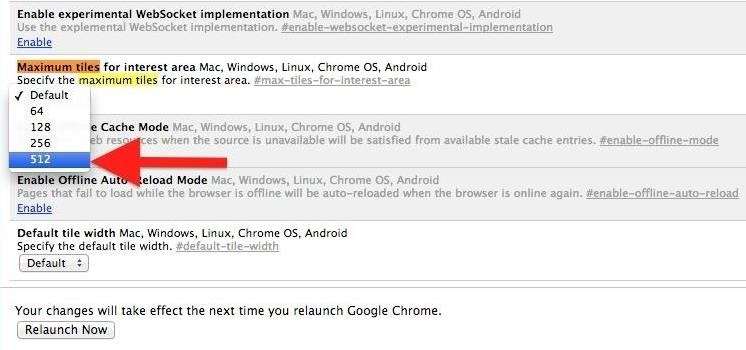
The first feature we're going to change is the number of "maximum tiles for interest area." Basically, this feature will increase the RAM that Chrome is allowed to use, and should take any little glitch out of your browsing experience.
In the search bar that you just opened in Step 2, type Maximum Tiles and hit Enter. Once you're brought to the Maximum Tiles row, click the drop-down menu and change Default to 512.

Speed Tip #2: Change the Number of Raster Threads to 4

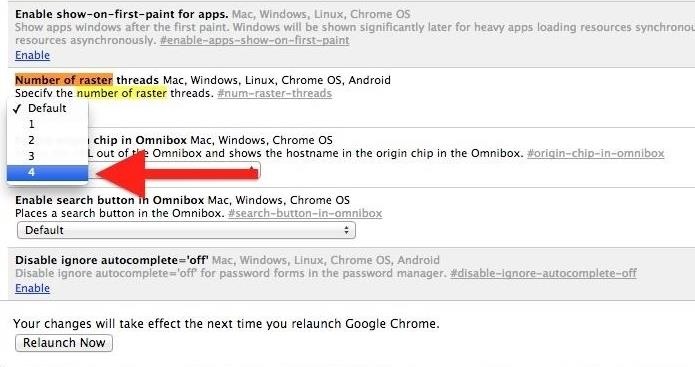
Tired of slow loading image? This modification will change the rendering speed of images in Chrome. Search for Number of Raster, and change the number of raster threads to 4.

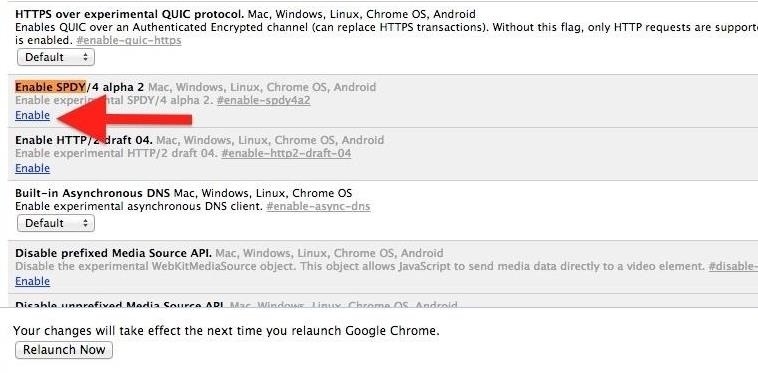
Speed Tip #3: Enable SPDY/4

This modification will speed up page loading by making web transactions quicker. Search for Enable SPDY, then click the little blue Enable link in the Enable SPDY row; its color should change from light grey to white and the blue link should now say "Disable."

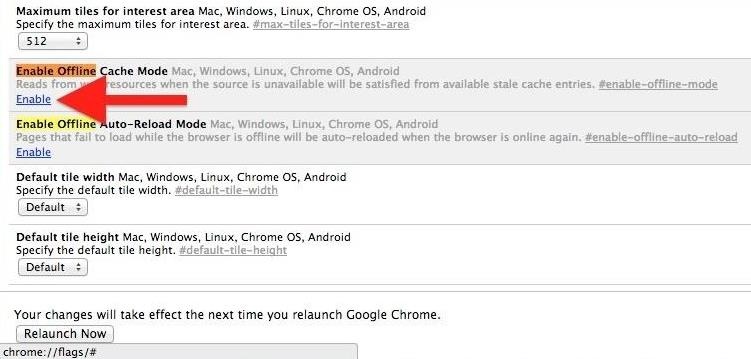
Speed Tip #4: Enable Offline Cache Mode

For moments where internet connectivity is briefly interrupted, you can allow Chrome to load cached versions of webpages. Search for Enable Chrome and click the Enable link in the Offline Cache Mode row.

Speed Tip #5: Enable Experimental Canvas Features

This modification allows Chrome to utilize opaque canvases to increase loading times and boost performance. Search for Enable Experimental Canvas and click Enable in the Experimental Canvas row.

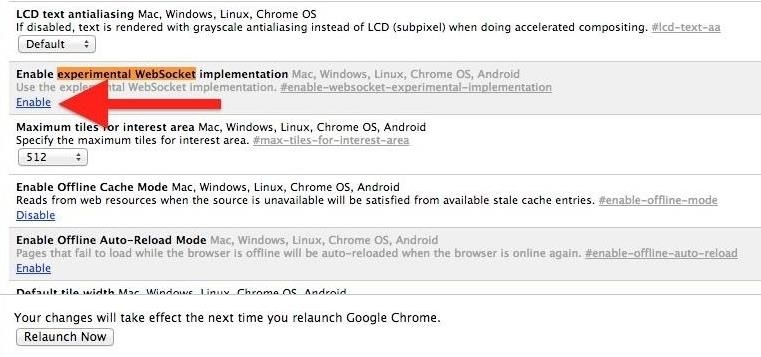
Speed Tip #6: Enable Experimental Websocket Implementation

This feature provides a different way to deal with web traffic communication. Search for Experimental Websocket and click Enable.

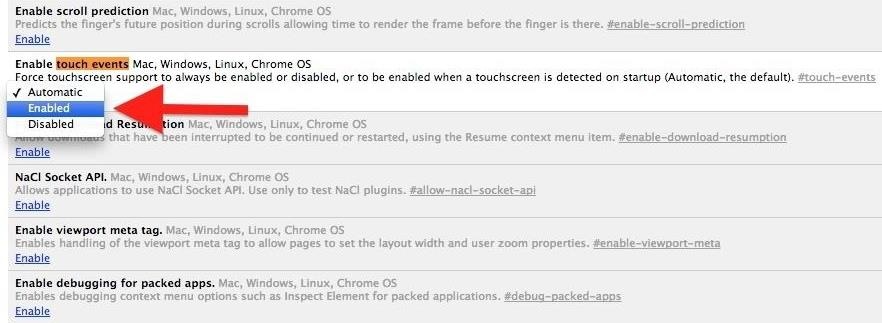
Speed Tip #7: Enable Touch Events

Chrome isn't so hot on touchscreens. If you're using an iPad, Microsoft Surface, or some other touchscreen computer, this will dramatically improve Chrome's performance. Search for Touch Events and selectEnable.

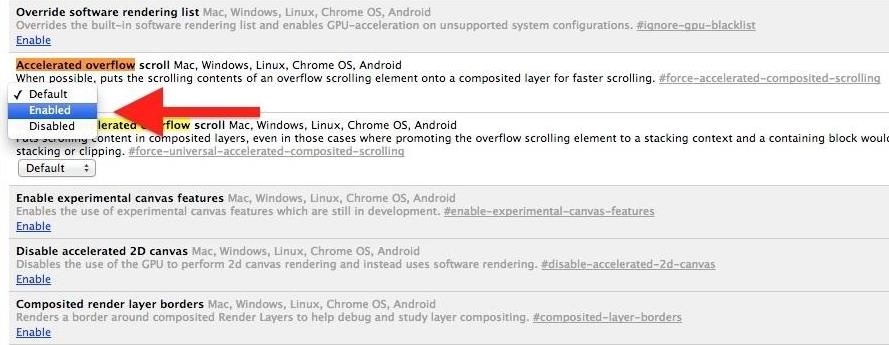
Speed Tip #8: Enable Accelerated Overflow Scroll

This will provide a better scrolling experience on particularly long pages. It works by compiling content into a single layer when it would otherwise be presented to you as in an overflow. Search for Accelerated Overflow and change to Enable.

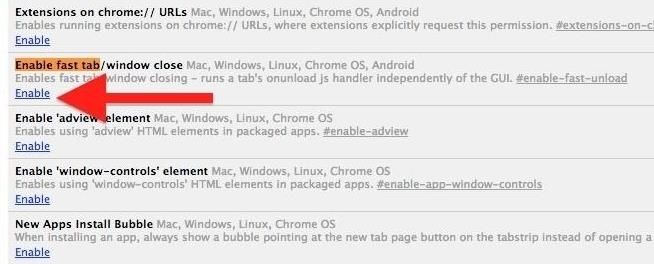
Speed Tip #9: Enable Fast Tab/Window Close

If you can't close a window or tab fast enough, try enabling the Fast Tab flag. This will get content out of your face faster than ever by running Chrome's JavsaScript handler independent of the graphical user interface (GUI). Search for Enable Fast Tab and select Enable.

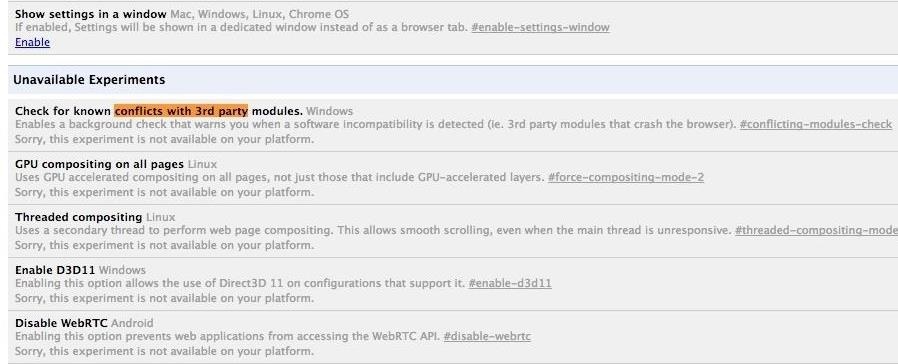
Speed Tip #10: Enable Checking for Conflicts with 3rd Parties

This only works on Windows, but it's pretty useful. There's nothing worse than a browser crashing in the middle of something important, so this option will run a background check to warn you if software is discovered that may crash the browser. Search Conflicts with 3rd Parties and Enableit.

Step 4: Relaunch Chrome

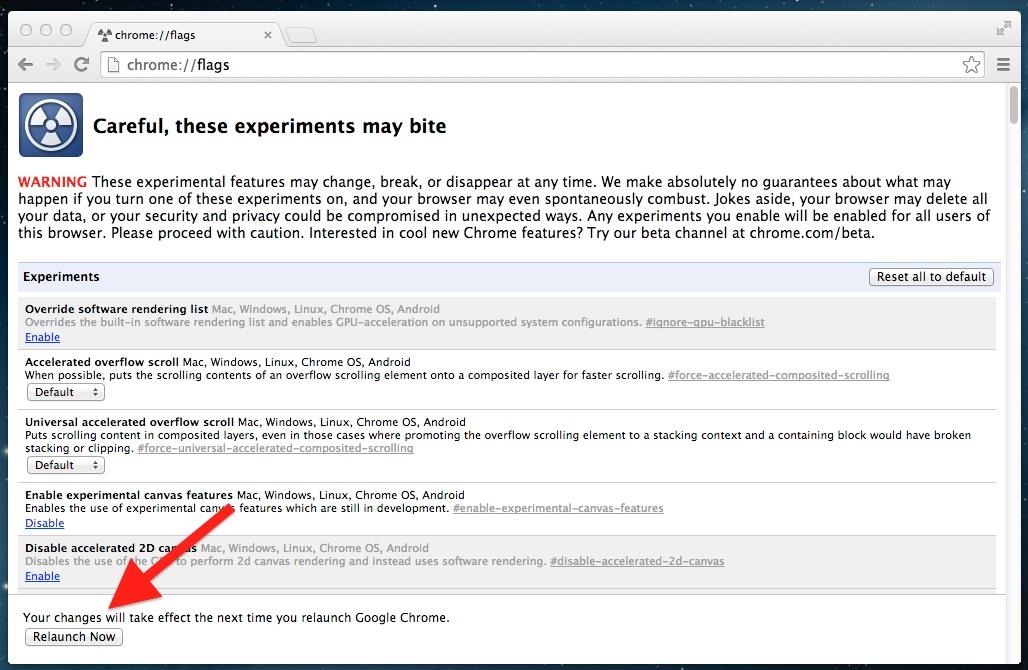
In order for these changes to take place, you'll need to relaunch Chrome. At the bottom of the chrome://flags page, you will notice a "Relaunch Now" button—click it, and enjoy your speedy browsing upon opening Chrome.
What speed-increasing flags do you find most useful? Share below!

Monday, 16 February 2015

DroidStealth An Android Encryption Tool with Stealth Capabilities


DroidStealth-Android-encryption-tool
We all have Internet-connected smartphones in our pockets, but it’s very hard to find a place on Internet to feel secure and private. No doubt, there is data Encryption on cell phones, but what’s the use if it is cracked by hackers or law enforcement?

What if the encrypted files don’t exist in the first place for law enforcement to decrypt it? That’s the motive behindDroidStealth, a new Android encryption tool that not only protects sensitive data with obfuscation, but ​also hides its existence on your phone as if it has nothing to hide.

DroidStealth Android app has been developed by security researchers from Delft University of Technology in the Netherlands and would come as a windfall to both the privacy lovers and the cyber criminals.

STEALTH LOGIN MECHANISM
DroidStealth Android encryption tool creates a hidden folder in your phone in which it stores your all encrypted files. The app itself can be opened by simply dialing a phone number of any length which is actually a pin or by punching an invisible widget on your phone's home screen five times.

The application is developed in order to hide the existence of any protection mechanism that usually hints casual inspectors that they need to do some tampering in an attempt to gain access to users’ encrypted data.
According to developer quartet Olivier Hokke, Alex Kolpa, Joris van den Oever and Alex Walterbos of Delft University of Technology, several other disguise techniques, such as hiding the app within a flashlight program, are used to hide your private data.
"Since simply encrypting the data is not enough, our approach provides an added step of obfuscation that increases security of the data: DroidStealth hides itself," the group wrote in the paper titled, 'A Self-Compiling Android Data Obfuscation Tool' co-authored with supervisor Johan Pouwelse.
"Instead of actually calling the number, the application launches, requesting the pin code. Furthermore, DroidStealth fully intercepts the call, making sure the number never gets added to the call log."
FEATURES OF DROIDSTEALTH
DroidStealth-Android-encryption-tool
Some DroidStealth Android encryption tool features are listed below:
  • The app is stored in a secretive mode, and can be renamed to appear as a benign app to "hide in plain sight".
  • The app doesn’t appear under the normal downloaded app list.
  • The app provides notification to the user if any of the secret files are left unlocked.
  • The can be kept out of the running process list when not in use.
  • The app does not pop up in the recent visited list.
LIMITATIONS OF DROIDSTEALTH
In a centralized store the DroidStealth Android encryption tool would result in a possible exposure threat, so it was distributed "nomadically" as an untrusted Android application rather than from the Google Play Store which would show up in a user's list of installed apps.

Secret data files would be encrypted using Facebook's Conceal API and could not be accessed from other apps or from its original location.

DRAWBACK OF DROIDSTEALTH
This may be one of the major drawback of DroidStealth app among others, which are listed below:
  • The data is encrypted and decrypted within the app.
  • Uninstalling the app may lead to deletion of all the data.
  • Low memory of the phone might lead to force quitting of the application and this might lead to loss of the data.
  • If a user's phone gets in the hands of investigation while the app is under decode mode, then it would be difficult for them to secure the data from officials.
GET DROIDSTEALTH NOW
The developers said that the DroidStealth Android encryption tool's user interface (UI) is chosen black "in order to give users the feeling that they are indeed working in secret".

DroidStealth app is not released on Google Play, but users can get it with a untrusted APK version of the App. The APK is available as an unaligned version, while users can download the nomadic versions of the app that are available throughout the Internet.

Thursday, 12 February 2015

Caller ID Faker App - Fake a call !


Image result for caller ID faker android


Caller ID faking, as modern as it may sound, goes back a decade to when the caller IDs were first introduced. At that time, the large scale businesses equipped with the costly PRI [Primary Rate Interface] lines mainly used the process of ‘caller ID spoofing’. A unit Primary Rate Interface line granted the business organisations with almost 23 phone lines all of which could have different address numbers. In its initial stages, the process of Caller ID spoofing was basically used by these business organisations to display one main number on all the calls they make, although the calls were not being held particularly by those numbers.
With the evolution of telephones and the introduction of smart phones, the techniques of caller ID spoofing have also evolved. Faking your caller ID has been made a lot easier with the caller ID faker android app. It allows you to make unlimited anonymous calls to any desired number. You can prank your friends and family with it, without the tension of being detected, EVER! If one ever thinks they are being cheated on, they can use this app to test their partner; obtaining all the information they may need! Evidence can also be stored with this app, but that will be discussed in the later part of the prose.
The caller ID faker android app has many such attributes that push it above the other ID spoofing apps, making it a must-have on your android device. Some of these are mentioned below;
The Record Option
The app offers it as a free option to record the calls you make with your device. Everything you say, everything the other party says in the conversation, can save in your phone if you want it to. You can make prank calls and listen to them afterwards whenever you feel down or miss your friends. On a serious note, if you are actually testing your partner with this app, and they say something controversial on the phone with the ‘fake you’ then you will have that conversation on your phone as evidence to use against them in the future.Input your Desired Caller ID
Not only can you hide your personal caller ID while calling, but you can even put any number you want as the displaying caller ID. You can call a certain friend while displaying another friend’s number to spice up the prank even more. Moreover, you can keep calling a person with changed numbers every time, making the receiver of the calls extremely confused, never knowing who is actually calling them.
Voice Changeover
Just when you thought this app could not get any better, BOOM! Another option! You can change your voice entirely during or before making a call. Not only can you change the general specifics of your voice, but even shift your voice to that of the opposite gender. In this way, you can never ever be detected, confusing the person being pranked more and more!
This app is loved by many, and on their requests, new updates are being launched to improve it. If you’re the pranky kind of guy, this app will serve you best!

Related Posts Plugin for WordPress, Blogger...
Twitter Delicious Facebook Digg Stumbleupon Favorites More

 
TRICKS AND TIPS CREATED BY SUSHIL UPADHYAY| Grants for single moms