HEY WELCOME TRICKS AND TIPS
HEY THERE ARE U LOOKING FOR SOME COOL EASY TIPS AND TRICKS CLICK HERE AND FIND SOME THING INTERESTING
SECURE YOURSELF LEARN HACKING
EVERYBODY ON NET WANTS TO BE SECURE AND SAFE . STARTING FROM BASIC LEARN SIPMLE HACKING TRICKS AND TIPS STEP BY STEP
CREATE VIRUS
LOOKING TO MAKE SOME VIRUS FOR UR FRIENDS .EASY AND FAST VIRUS CREATION BY NOTEPAD MUST SEE
Sunday, 12 June 2011
Display Selected Friends Only on your Facebook Profile
Firesheep Makes Facebook Hacking Easy
What is Session Hijacking?
In a Http session hijacking attack an attacker steals victims cookies, Cookies stores all the necessary Information about one’s account , using this information you can hack anybody’s account and change his password. If you get the Cookies of the Victim you can Hack any account the Victim is Logged into i.e. you can hack Facebook Google, Yahoo, Orkut, Flickr etc or any other email account
How can a Hacker use Firesheep to Hack a Facebook or any other account?
Now I will tell you how can a hacker use firesheep to hack a facebook or any other account, You will need the following things:
Method
1. First of all download "Firesheep" from the above link and use the "openwith" option in the firefox browser
2. Once you have installed firesheep on firefox web browser, Click on view at the top, then goto sidebar and click on Firesheep
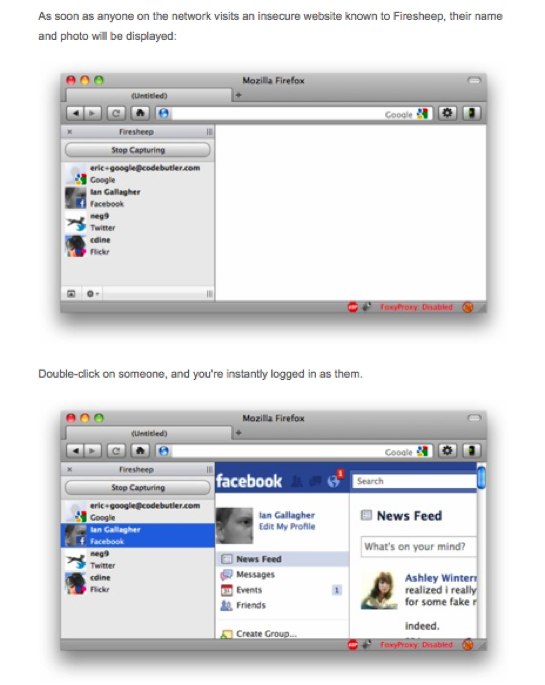
3. Now click on the top left button "Start capturing" and it will start to capture the session cookies of people in your wifi network, This will show you the list of those people whose cookies are captured and have visited unsecured website known to firesheep, Double click on the photo and you will be logged in instantly
:) :( :P :D :O ;) 8) 8| >:( :\ :'( 3:) O:) :-* ♥ ^_^ -_- O.o >:o :v :3 :|] :putnam:
¢ – cent
£ – pound
¤ – currency
¥ – yen
€ – euro sign
§ – section
© – copyright
® – registered trademark
™ – trademark
° – degree – e.g. 45°
¹ – superscript 1
² – superscript 2
³ – superscript 3
· – middle dot
¸ – spacing cedilla
¼ – fraction 1/4
½ – fraction 1/2
¾ – fraction 3/4
¿ – inverted question mark
× – multiplication
÷ – division
• – bullet = black small circle
◊ – lozenge
℠ – Service Mark
℃ – Celsius
℅ – care of
℉ – Farenheit
№ – numero symbol – number sign
℗ – Sound Recording Copyright
℞ – Prescription Take pharmaceutical symbol
Ω – Ohm
℧ – Inverted Ohm
☀ – sunshine – sun
☁ – cloudy – cloud – dark cloud
☂ – raining – rain – umbrella
☃ – snow – snowman
☄ – shooting star
★ – star solid
☆ – star outline
☇ – lightning
☈ – thunderstorm
☉ – sun
☊ – ascending node
☋ – descending node
☌ – conjunction
☍ – opposition
☎ – phone
☏ – phone symbol outline
☐ – check box
☑ – check box check mark
☒ – ballot box with X
☓ – St. Andrew’s Cross
☚ – left-pointing index finger
☛ – right-pointing index finger
☜ – left-pointing index finger
☝ – upwards pointing index finger
☞ – right pointing index finger
☟ – downwards pointing index finger
☠ – skull & crossbones
☡ – caution sign
☢ – radioactive sign
☣ – biohazard sign
☮ – peace sign
☯ – yin & yang
☹ – frowning face
☺ – smiley face
☻ – black smiley face
☽ – waxing crescent moon
☾ – waning crescent moon
♈ – Aries
♉ – Taurus
♊ – Gemini
♋ – Cancer
♌ – Leo
♍ – Virgo
♎ – Libra
♏ – Scorpio
♐ – Sagitarius
♑ – Capricorn
♒ – Aquarius
♓ – Pisces
♔ – White King
♕ – White Queen
♖ – White Rook
♗ – White Bishop
♘ – White Knight
♙ – White Pawn
♚ – Black King
♛ – Black Queen
♜ – Black Rook
♝ – Black Bishop
♞ – Black Knight
♟ – Black Pawn
♠ – black spade suit
♢ – red diamond suit
♣ – black club suit = shamrock
♤ – red spade suit
♥ – black heart suit = valentine
♦ – black diamond suit
♧ – red club suit
♨ – hot springs
♩ – musical quarter note
♪ – musical eighth note
♫ – musical single bar note
♬ – musical double bar note
♭ – flat note
♮ – natural note
♯ – sharp note
✁ – cut above
✂ – cut here
✃ – cut below
✄ – scissors
✆ – public pay phone
✇ – film reel – tape spool
✈ – airport jet airplane
✉ – envelope mail email
✌ – victory sign
✍ – signature – sign here
✎ – pencil diagonal down
✏ – pencil
✐ – pencil diagonal up
✓ – check mark
✔ – heavy check mark
✕ – multiplication sign X
✖ – heavy multiplication sign X
✗ – ballot X
✘ – heavy ballot X
✝ – Latin Roman Cross
✞ – Latin Cross 3D shadow
✟ – Latin Cross outline
✠ – Maltese Cross
✡ – Star of David
❛ – quotation mark single turned comma
❜ – quotation mark single comma
❝ – quotation mark double turned comma
❞ – quotation mark double comma
3 Ways To Use Facebook Chat On Your Desktop
Note: When you use facebook chat from desktop IMs, you will be able to use all feature that are present in facebook’s build-in online messenger.
Digsby (Cross-Platform)
Digsby is the first 3rd party messenger to support facebook’s chat feature. It is a cross-platform messenger available for Windows, Mac OS X, and Linux. No hacks or plugins are required. Just register for an Digsby account and login with it. Once you are logged in, click Add Account. Now in the Accounts tab, click Add IM Account and select Facebook Chat from the list.Enter your facebook login details and start chatting.
It’s that simple!
Pidgin (Cross-Platform)
Pidgin is an opensource 3rd party IM that has a large user base but sadly till today there is no official support for facebook chat. The only way to connect with Facebook chat is through a plugin.Grab the Facebook Chat Plugin for Pidgin and with it you can log into the Facebook servers, grab the buddy list, send/receive messages, add/remove friends, receive notifications, search for Facebook friends and set your Facebook status.
Once you have installed this plugin, you will find Facebook listed among the supported IMs.
Enter your facebook login details and click Add. Once added, you will see the list of facebook buddies that are online instantly.
Adium (Mac OS X)
Adium is a free opensource IM for Mac OS X. The latest version(1.3.3) has a build-in support for facebook chat, just login with your facebook account and you are good to go.Above screenshot is taken from AllFacebook
Editor’s Note (Conclusion)
Digsby has an official support for Facebook Chat and is available for all three operating systems, Pidgin has no official support for Facebook Chat but can be added with a plugin, while Adium officially supports Facebook Chat but is only available for Mac OS X. I prefer to use Digsby since it is more user-friendly, has full support of Facebook chat, and is available for all popular OS. What do you think?Saturday, 11 June 2011
Submit your blogs to Search Engines
Search Engine Optimization (SEO) aims at increasing the volume and improving the quality of traffic to a website from search engine results. Search engines work on different algorithms to analyze the contents and keywords, and present the search results. Google, for instance, assigns page ranks to the sites and sites that rank highly will appear early in the results. Of course, many other factors are considered by search engines, such as relevance, unique content, coding and quality of links. The major search engines know that revealing these factors will only encourage manipulation of the ranking system and have thus been secretive about how the ranking algorithms work.
While no SEO consultant can be absolutely certain about how each search engine views your site, the common agreement is that the more visible your site is on the internet, the higher your ranking will eventually be. Having your site linked to by many other sites and indexed by different search engines increase its exposure and visibility
Here we shall provide a list of search engines where you can submit your website or Blog URLs for Free and have your site or Blog indexed by the search engines.
Unless you have created a private blog, it is a matter of time that your blog is indexed by the major search engines like Google, Yahoo and MSN. One of the fastest ways to have your site indexed is to get another site that is already in the search engine listings to link to you. When the search engine crawlers visit that site, they will find your site and index it.
Hence, try this method if you do not want to wait for search engines to approve your site submission.
While no SEO consultant can be absolutely certain about how each search engine views your site, the common agreement is that the more visible your site is on the internet, the higher your ranking will eventually be. Having your site linked to by many other sites and indexed by different search engines increase its exposure and visibility
Here we shall provide a list of search engines where you can submit your website or Blog URLs for Free and have your site or Blog indexed by the search engines.
Website Indexing
Unless you have created a private blog, it is a matter of time that your blog is indexed by the major search engines like Google, Yahoo and MSN. One of the fastest ways to have your site indexed is to get another site that is already in the search engine listings to link to you. When the search engine crawlers visit that site, they will find your site and index it.
Hence, try this method if you do not want to wait for search engines to approve your site submission.
1. To check if your site has been indexed by a search engine, enter the full URL into their search query. For some search engines like Microsoft Live Search, enter site: followed by the full URL. If you see your site appearing in the search results, it has been indexed and there is no need to resubmit the site.
2. If your Blog has been linked to by Blog Directories, websites or Blogs, you may see these other sites that mention your Blog appearing first in the search results. More likely than not, they have a higher page rank. Scroll through the remaining search result pages and you will probably find a listing that is solely about your Blog.
3. When submitting your site, you do not need to submit the URL of each individual webpage. Submit only the top-level webpage and for Blogger Blogs, it will be an address like this http://blogname.blogspot.com without the www. before the blogname.
4. You can submit your sitemap to Google and login to Google Webmaster site to know the status of the indexing and view traffic statistics. Also, submit your sitemap to Yahoo! to find out more about the index and links to your site. Submit Blogger Sitemap to MSN and Ask.com too.
5. If you add your URL in Yahoo!, it will appear in their other search sites like AlltheWeb and AltaVista as well. Similarly, AOL Search uses the data by Google.
6. Some of the sites send advertisements and newsletters to you in exchange for free submission. If you don't want that, remember to opt out of it. Avoid having your regular email account filled with these mail by creating another free web-based email account just for website submissions.
7. Since search engines have different standards of content, design and technical specifications, submission of your site does not guarantee that it will be included in their database.
6. Some of the sites send advertisements and newsletters to you in exchange for free submission. If you don't want that, remember to opt out of it. Avoid having your regular email account filled with these mail by creating another free web-based email account just for website submissions.
7. Since search engines have different standards of content, design and technical specifications, submission of your site does not guarantee that it will be included in their database.
List of Search Engines
You may submit your site URL to these search engines for Free. If you lack the time, submit your site to the top few leading search engines.
http://www.google.com/addurl/.
ht
http://www.alexa.com/help/webmas
http://www.baidu.com/sea
http://www.exactseek
http://searchsight.com/sub
http://www.scrubtheweb.com/addur
http://www.entireweb.com/free_sub
http://gigablast.com/addurl.
htt
http://www
http://www.w
http
http://www.splatsearch.com/submit.html.
h ttp://www.walhello.com/addlinkgl.html.
ht tp://www.searchit.com/addurl.htm.
http:// www.mozdex.com/support/addurl.html.
http: //submit2.jayde.com/.
http://www.infotige r.com/addurl.html.
http://www.abacho.de/.
http://monster.exploituk.net/suspended.p age/.
http://www.towersearch.com/addurl.p hp.
http://www.the-search-site.com/add_ur l_form.asp.
http://www.websquash.com/cgi- bin/search/search.pl?Mode=AnonAdd.
http:/ /unasked.com/webmasters.
http://search.ev isum.com/addsite.htm.
http://dinosearch.c om/dinosearch/addurl.asp.
http://www.sear chtheweb.com/suggest/.
h
ht
http://
http:
http://www.infotige
http://www.abacho.de/.
http://www.towersearch.com/addurl.p
http://www.the-search-site.com/add_ur
http://www.websquash.com/cgi-
http:/
http://search.ev
http://dinosearch.c
http://www.sear
Website Submission Services
There are many sites on the internet offering free website submission services to search engines. The list of search engines are by and large the same. For a fee, some of them offer to send your URL to more than a hundred search engines. Is it necessary to have your webpage listed in all the smaller search engines? We think that Google, Yahoo! and MSN have cornered such a large share of the market that it is sufficient just to have your website listed there. However, the decision is yours to make. For a start, you may want to use their free services and monitor the traffic.
http://www.evrsoft.com/fastsubmit/.
http: //www.submitexpress.com/.
http://www.addm e.com/.
http://www.freesubmissionweb.com/ .
http://www.ineedhits.com/free-tools/sub mit-free.aspx.
http://www.submitshop.com/ freesubmit/freesubmit.html.
http://www.se archengineoptimising.com/free-search-eng ine-submission.
http://www.addpro.com/sub mit30.htm.
http://www.pageranklist.net/se arch_engine_add_url.php.
http://freewebsu bmission.com/.
http://addurl.amfibi.com/.
http://www.burf.org.uk/submit.php.
http:/ /submitforce.jerkasmarknad.com/.
http://w ww.localsubmit.com/free.asp.
http://www.s rsubmit.info/.
http:
http://www.addm
http://www.freesubmissionweb.com/
http://www.ineedhits.com/free-tools/sub
http://www.submitshop.com/
http://www.se
http://www.addpro.com/sub
http://www.pageranklist.net/se
http://freewebsu
http://addurl.amfibi.com/.
http:/
http://w
http://www.s
Thursday, 9 June 2011
Chapter 10 : RATs (Hacking on Server's PC)
Introduction :
A Remote Administration Tool (known more commonly on the Internet as a RAT) is used to remotely connect and manage a single or multiple computers with a variety of tools, such as:- Screen/camera capture or control
- File management (download/upload/execute/etc.)
- Shell control (usually piped from command prompt)
- Computer control (power off/on/log off)
RAT Trojan Horses :
Many trojans and backdoors now have remote administration capabilities allowing an individual to control the victim's computer. Many times a file called the server must be opened on the victim's computer before the trojan can have access to it. These are generally sent through email, P2P file sharing software, and in internet downloads. They are usually disguised as a legitimate program or file. Many server files will display a fake error message when opened, to make it seem like it didn't open. Some will also kill antivirus and firewall software. RAT trojans can generally do the following: Download, upload, delete, and rename files- Format drives
- Open CD-ROM tray
- Drop viruses and worms
- Log keystrokes, keystroke capture software
- Hack passwords, credit card numbers
- Hijack homepage
- View screen
- View, kill, and start tasks in task manager
- Hide desktop icons, taskbar and files
- Print text
- Play sounds
- Randomly move and click mouse
- Record sound with a connected microphone
- Record video with a connected webcam
Some RAT trojans are pranks that are most likely being controlled by a friend or enemy on April Fool's day or a holiday. Prank RATS are generally not harmful, and won't log keystrokes or hack. They usually do disruptive things like flip the screen upside-down, open the CD-ROM tray, and swap mouse buttons. However, they can be quite hard to remove.
Popular RAT Software :
- Shark
- Bifrost
- Bandook
- BO2K
- ProRAT
- SpyRAT
- HackRAT
- Netbos
- Optixe
- AutoSpY
- Nclear
- Amituer
- Bandk
- Yuri RAT
- Y3k RAT
- slha RAT
- Openx RAT
- Poison Ivy RAT
- Mosucker
- SubSeven RAT
- Nuclear RAT
- NetBus RAT
- ProRAT
- megapanzer
- LanHelper
But i suggest using optix pro
so a short tutorial on how to use optix for you guys..
How to use it ?
So a short tutorial on how to use optix for you guys..
1) INTRO :
It isnt that hard to use.The Program used to build server files are :
.ClientClient.exe = Client
.BuilderBuilder.exe = Builder
WARNING: DO NOT RUN THE FILE(s) THAT YOU CREATE WITH BUILDER.EXE - THESE
FILES ARE THE ONES INTENDED TO RUN ON THE REMOTE COMPUTER THAT YOU WANT.TO REMOTELY ADMINISTRATE, NOT YOUR OWN!!!!
2) Quick Start Tutorial:
1) Open Builder
2) Click"Build/Create Server:" button
3) Save Server as "server.exe"
4) Click UPX Packing
5) Click OK
6) Run Server.exe on the computer you wish to administrate (WARNING: NOT ON YOUR OWN COMPUTER!!!)
7) Open Client
8) Type in IP Address of other computer
9) Hit the Green Button in top-right hand corner to connect!
To find out exactly how to use a particular part of the program, simply
hover your mouse button over the face of a button, control etc. and a
"help hint" will appear instructing you as to the purpose of that
particular field/button etc.
UPX Packing is automated in the server build process if you wish to pack
your file!
to get an up-2-date copy of BlackFire's cgi logger (cgi notification)
go to:
However a new logger (alternativecgilogger.zip) is also provided in
this version. Advanced users check it out!
3) FEATURE LIST :
v1.33 - Client Side :
Client SOCKS 4/5 Support
Power Options - logoff,suspend,reboot,shutdown etc.
Server Information - Get info about builder settings
File Manager
Process Manager
Windows Manager
Registry Manager
FTP Manager
SOCKS 4/5 Server
Remote IP Scanner
Port Redirect
Application Redirect
Service Manager
Message Box
Matrix Chat (Client-2-vic)
Client-2-Client chat
Computer Information
Get Passwords - (RAS/Cached - 9x and AIM)
Online Key Logger - (now window titles)
Screen Capture with left click mouse manipulation
Keyboard Manipulation - (more advanced)
Cam Capture
SendKeys - old version of SendKeys for older servers
Humor normals - Flash keyboard lights, Monitor on/off, Disable keyboard/mouse etc.
Humor Screen Printer - print text to their screen!
v1.33 - Server Side :
Configurable:
Notification Information Separators
IP Address Separator
Info included in any Notification
Idenfitication Name
Server Port
Server Password
Fake Error
Server Icon
Registry Run startup
Registry RunServices startup
win.ini startup
system.ini startup
s7 special method startup!
Server File Name
Start Directory (windir/sysdir)
Melt Server
Unlimited ICQ Number Notification
Unlimited CGI Script Notification
Unlimited IRC Server/channel Notification
Unlimited PHP Script Notification
Unlimited SMTP Notification
Toggling killing of in-built exe/service list for firewalls
Toggling killing of in-built exe/service list for Anti-Virus
Toggling killing of in-built exe/service list for packages classifed as both anti-virus and firewall!
Unlimited Number of custom exe's to kill
Unlimited Number of custom services to kill
Easily Automated UPX Packing if needed.
Option for unpacked or packed server with your own packer if wanted (instructions clear)


04:16
TUTORIALS TRICKS TIPS HELP EXPLORE UR KNOWLEDGE